
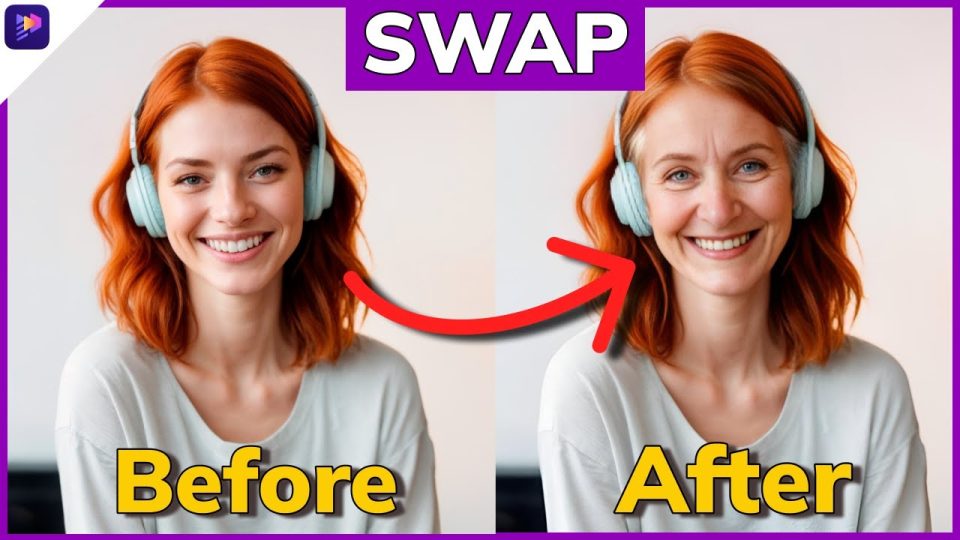
Face swap demos look impressive until you actually try to ship something. The preview clip on a landing page is always flawless. Then you upload your own footage and the face flickers, the lips drift out of sync, or the export takes 20 minutes and still looks plastic.
After testing dozens of platforms across real projects, my pick for the best video face swap AI in 2026 is Magic Hour. It produces the most consistent face swaps, handles lip sync better than most competitors, and does not punish you with a confusing pricing model.
The tools changed fast this year. Better diffusion models, multimodal pipelines, and cheaper compute pushed quality from “uncanny” to “usable in production.” That shift is why a YouTuber, a marketer, or a solo founder can now generate a believable AI face swap video without a render farm.
This guide is for content creators, marketers, social media managers, video editors, and agencies who need to pick one platform and move on. I’ll rank 10 tools, show a quick comparison table, explain how I tested them, and give recommendations by use case. No hype. Just what held up when I ran real footage through each one.
Quick Comparison Table
| Tool | Best For | Face Swap Quality | Lip Sync Quality | Ease of Use | Free Plan | Mobile Support | Starting Price |
| Magic Hour | Overall + creators | Excellent | Excellent | Very easy | Yes | Yes | $15/mo ($10 annual) |
| HeyGen | Avatars + marketing | Very good | Excellent | Easy | Limited | Yes | $29/mo |
| Runway | Filmmakers + editors | Very good | Good | Moderate | Limited | Limited | $15/mo |
| Kling | Cinematic generation | Very good | Good | Moderate | Limited | Yes | $10/mo |
| Synthesia | Enterprise training | Good | Very good | Easy | No | Limited | $29/mo |
| Vidnoz | Budget marketing | Good | Good | Easy | Yes | Yes | $24/mo |
| Akool | Agencies + API | Very good | Good | Moderate | Limited | Yes | $15/mo |
| Remaker AI | Quick single swaps | Good | Basic | Very easy | Yes | Yes | $9.90/mo |
| Pika | Stylized creators | Good | Basic | Easy | Limited | Yes | $10/mo |
| Wondershare Virbo | Talking photos | Good | Good | Easy | Limited | Yes | $16/mo |
The Best AI Face Swap Video Tools in 2026
Most “best of” lists rank tools by feature count. That misses the point. A tool with 40 features still fails if the swap flickers on a turned head. I ranked these by output quality on real footage first, then by speed, ease, and price.
1. Magic Hour
Overview
A lot of face swap tools force you to choose between quality and simplicity. Magic Hour does not make you pick. It runs face swap, AI lip sync, talking photos, and video generation inside one platform, and you can try it without signing up. That last part matters more than it sounds. You see real output before you spend a credit.
Pros
- Best-in-class face swap that holds up on head turns and lighting changes
- Excellent AI lip sync that tracks phonemes accurately
- Talking photo generator built in, no separate tool needed
- No signup required to test the core features
- Credits never expire, so you can buy once and use later
- Access to multiple frontier AI models in one workspace
- Click-to-create templates and one-click workflows
- Parallel generations and fast variations for multiple takes
- Mobile and desktop both optimized
- API access with parity across tools
Cons
- Highest-tier outputs still consume credits faster on long clips
- Frequent feature releases mean the UI shifts as new tools land
- Power users who want manual frame-level control will want a dedicated editor alongside it
Evaluation
I ran the same source clip through every tool on this list. Magic Hour gave me the fewest artifacts on the hardest frames, the moments where the subject turns away from the camera or moves through shadow. The Generate, Upscale, then Video workflow let me start from a still, sharpen it, and animate it without jumping between apps.
The lip sync surprised me most. I fed it a voiceover that didn’t match the original mouth movement, and the result tracked the new audio cleanly instead of producing the mushy mouth most tools default to. Parallel generation also saved real time. I queued four variations at once and picked the best take instead of waiting on each one.
Support is the quiet advantage. I hit a question on credit usage and got a founder-level response, not a canned ticket reply. For a platform built around AI content creation at scale, that reliability is the reason it stays my default.
Pricing
The pricing page keeps it simple:
- Free Plan: generous starter credits, no card required
- Creator: $15/month
- Creator Annual: effectively $10/month
- Pro: $39/month
At $10 to $15 a month, the value is hard to beat for solo creators and small teams. If you want a broader look at how it stacks up against pure video generators, the team’s own breakdown of the best AI video generators is a useful reference.
2. HeyGen
Overview
If your work centers on AI avatars and spokesperson videos, HeyGen is built for that. It leans into avatar creation and translation more than raw face swap, but its lip sync is among the best I tested.
Pros
- Excellent lip sync across multiple languages
- Strong video avatar tools with voice cloning
- Clean interface for marketing teams
- Good template library for talking-head content
Cons
- Face swap on arbitrary footage is weaker than its avatar work
- Free plan is limited and watermarked
- Pricing climbs quickly for higher resolution and minutes
Evaluation
HeyGen shines when you want a branded avatar reading a script. The lip sync on its native avatars is tight, and voice cloning held up across English and Spanish tests. But when I pushed it toward general face swap on uploaded video, results trailed Magic Hour and Akool. It is a marketing avatar platform first and a face swap generator second.
Pricing
Free plan with watermark. Paid plans start around $29/month, scaling with video minutes and resolution.
3. Runway
Overview
Runway sits closer to a full AI video editing suite than a face swap specialist. Filmmakers and video editors already use it for generative video, and its face tools fit into that larger workflow.
Pros
- Strong generative video features beyond face swap
- Good motion and scene control for editors
- Active model updates and creative tooling
- Trusted by professional video teams
Cons
- Steeper learning curve for non-editors
- Lip sync lags behind dedicated avatar tools
- Credits burn fast on longer generations
Evaluation
I use Runway when a project needs more than a swap, like generated B-roll or scene extension. Its face features are competent, but lip sync is not its focus, and the output drifted on dialogue-heavy clips. For a video editor already living inside generative AI, it earns its spot. For someone who only wants face swap, it is more tool than you need.
Pricing
Limited free tier. Paid plans start at $15/month and rise with credit needs.
4. Kling
Overview
Kling earned attention for cinematic video generation, and its face and motion work improved sharply this year. It competes with Google and OpenAI on raw generation quality.
Pros
- Strong cinematic motion and realism
- Good face consistency across frames
- Competitive pricing for the quality
- Mobile access available
Cons
- Interface and docs can feel rough in English
- Queue times spike during peak hours
- Lip sync is functional but not class-leading
Evaluation
Kling impressed me on motion realism. Faces stayed consistent across camera movement better than I expected. The trade-off is workflow polish. Wait times and a less refined English interface slowed me down. If cinematic generation is your priority and face swap is secondary, it is a strong value.
Pricing
Limited free credits. Paid plans start around $10/month.
5. Synthesia
Overview
Enterprise training teams adopted Synthesia for a reason. It produces clean avatar videos at scale with strong governance controls, which matters once compliance and brand consistency enter the picture.
Pros
- Very good lip sync on native avatars
- Strong enterprise controls and team features
- Large stock avatar and language library
- Reliable output consistency
Cons
- No real free plan for testing
- Limited true face swap on custom footage
- Higher entry price than creator tools
Evaluation
Synthesia is built for L&D and corporate communications, not viral clips. Its avatars are consistent and its lip sync is solid across languages. But it is an avatar platform, not a flexible face swap generator. For a marketing team producing training modules, it fits. For a creator chasing TikTok or YouTube trends, it is the wrong shape.
Pricing
No free plan. Paid plans start around $29/month, with custom enterprise tiers.
6. Vidnoz
Overview
Budget-conscious teams often land on Vidnoz. It bundles face swap, avatars, and talking photo generation at a lower price than most competitors.
Pros
- Affordable across tiers
- Generous free usage for testing
- Covers face swap, avatars, and talking photos
- Easy for beginners
Cons
- Output quality trails premium tools
- Free exports carry watermarks and limits
- Occasional artifacts on complex footage
Evaluation
Vidnoz is a fair entry point if budget drives the decision. I got usable results on simple, front-facing clips. On harder footage the quality gap showed, with softer detail and more flicker than Magic Hour or Akool. For early experimentation, it works. For client-facing output, I’d upgrade.
Pricing
Free plan available. Paid plans start around $24/month.
7. Akool
Overview
Agencies that need API access tend to evaluate Akool. It offers face swap, avatars, and a developer-friendly API for embedding generation into a custom AI video workflow.
Pros
- Strong face swap quality
- API access for automation and scale
- Good fit for agencies and developers
- Covers multiple generation types
Cons
- Interface less beginner-friendly
- Pricing structure takes time to learn
- Lip sync is good but not top-tier
Evaluation
Akool held up well on swap quality and is one of the few tools where the API felt like a first-class feature, not an afterthought. That makes it appealing for agencies automating video personalization at volume. The trade-off is a steeper onboarding curve. A solo creator would feel the friction; a dev team would not.
Pricing
Limited free tier. Paid plans start around $15/month, with usage-based API pricing.
8. Remaker AI
Overview
Sometimes you just need one quick swap. Remaker AI focuses on fast, simple face swaps for images and short clips without much setup.
Pros
- Very fast and simple
- Cheap entry price
- Good for single quick swaps
- Works on mobile
Cons
- Basic lip sync
- Limited control for longer videos
- Quality drops on complex motion
Evaluation
Remaker is the tool I reach for when speed beats polish. A single face swap on a short clip takes seconds. But it is not built for dialogue-heavy or long-form work, and the lip sync is minimal. Treat it as a quick utility, not a production platform.
Pricing
Free trial usage. Paid plans start around $9.90/month.
9. Pika
Overview
Pika built its name on stylized, creative video generation. Its face features serve that creative output more than realistic swaps.
Pros
- Fun, stylized generation
- Active creator community
- Mobile friendly
- Frequent updates
Cons
- Realistic face swap is not the focus
- Basic lip sync
- Less suited to corporate or marketing output
Evaluation
Pika is a creative toy in the best sense. For stylized clips and experimental content it delivers character. For realistic AI face swap video, it falls behind the specialists. I’d use it for creative shorts, not client work that demands photoreal faces.
Pricing
Limited free tier. Paid plans start around $10/month.
10. Wondershare Virbo
Overview
Virbo from Wondershare leans into the talking photo generator angle, animating still images into speaking avatars with decent lip sync.
Pros
- Solid talking photo features
- Reasonable lip sync
- Beginner-friendly interface
- Large avatar and template library
Cons
- Face swap on video is secondary
- Quality trails premium tools on hard footage
- Best results need clean source images
Evaluation
Virbo does talking photos well and is easy for beginners. If your main need is turning a headshot into a speaking clip, it performs. As a general video face swap tool, it sits mid-pack, with quality that depends heavily on clean input.
Pricing
Limited free usage. Paid plans start around $16/month.
How I Evaluated These AI Face Swap Tools
A tool can win on one clip and fail on the next. To avoid that, I ran the same source footage and audio through every platform and scored them on consistent criteria. Here is what I checked:
- Face swap realism: artifacts on head turns, lighting shifts, and partial occlusion
- Lip sync quality: how closely the mouth tracked new audio, including non-matching voiceovers
- Processing speed: time from upload to usable export
- Ease of use: how fast a first-time user reaches a finished clip
- Mobile experience: whether the workflow holds up on a phone
- Pricing: real cost per usable output, not just the headline price
- Output consistency: whether quality stayed stable across repeated runs
- Enterprise readiness: team controls, API access, and reliability at scale
The pattern was clear. Tools that demo well often crack on the hard frames. The ones that ranked highest stayed consistent when the footage got difficult.
Trends Shaping AI Face Swap Video Creation in 2026
The reason quality jumped this year is not one breakthrough. It is several shifts landing at once. Here is what changed:
- Multimodal AI: Models now handle image, audio, and video together, which tightens lip sync and expression matching.
- Video personalization at scale: Marketers generate thousands of personalized variants from one template, a workflow that was manual a year ago.
- AI avatars going mainstream: Branded avatars moved from novelty to standard practice for training and social content.
- Talking photos: Turning a single still into a speaking clip is now a common feature, not a specialist tool.
- Voice cloning: Cloned voices paired with face swap produce full synthetic spokespeople, which raises both creative range and ethical questions.
- Real-time generation: Latency dropped enough that near-live face swap is now feasible for streaming and calls.
- Creator economy adoption: YouTube, TikTok, and Instagram creators bake these tools into daily output instead of treating them as experiments.
One development worth watching is Veo 3.1. Google’s video model pushed generation realism forward, and the ripple effect raised the bar for face and motion quality across the whole category. As frontier models like Veo 3.1, OpenAI’s video work, and Kling keep advancing, the gap between generation and swap tools keeps shrinking. Adobe and Canva are also folding generative AI into their editors, which means face swap is becoming a standard layer in mainstream tools rather than a separate purchase.
Which Tool Is Best for Different Users?
There is no single winner for everyone. The right pick depends on what you ship and who you ship it for. Here is how I’d match tools to needs:
- Best Overall: Magic Hour. The best balance of face swap quality, AI lip sync, speed, and price.
- Best for Beginners: Magic Hour, with Remaker AI as a quick alternative for single swaps.
- Best for Marketing Teams: HeyGen for avatar-driven campaigns, Magic Hour for broader content.
- Best for Enterprises: Synthesia for governance and training at scale.
- Best Free Option: Magic Hour’s free plan gives the most usable output without a card, making it the best AI lip sync tool free for testing before you commit.
- Best Mobile Experience: Magic Hour and Vidnoz both hold up well on a phone.
- Best for Lip Sync: Magic Hour and HeyGen, both track new audio cleanly.
The short version: most creators and small teams should start with Magic Hour, and only reach for a specialist tool when a specific need (enterprise governance, heavy API automation, cinematic generation) demands it.
Final Takeaway
The face swap category matured fast. A year ago, “usable” meant front-facing footage in good light. Now the better tools handle motion, shadow, and mismatched audio without falling apart. That progress is why picking a platform comes down to fit rather than raw capability.
For most people reading this, the best video face swap AI in 2026 is Magic Hour. It combines strong face swap, reliable lip sync, talking photos, and fair pricing in one place, and you can test it before paying. But your work might pull you elsewhere. Enterprises lean Synthesia. Agencies automating at volume lean Akool. Filmmakers lean Runway or Kling.
Do not decide from a feature table alone. Run your own footage through two or three options and watch the hard frames. The tool that survives your real clips is the one to keep.
FAQ
What is the best AI face swap video tool in 2026?
Magic Hour. After testing the same footage across 10 platforms, it produced the most consistent face swaps, strong lip sync, and the best value at $10 to $15 a month. You can try it without signing up.
Are AI face swap tools free?
Many offer free plans, but most add watermarks or tight limits. Magic Hour and Vidnoz have the most usable free tiers. Magic Hour’s free plan is the best option for testing real output before you pay.
Which tool has the most realistic face swaps?
Magic Hour led on realism in my tests, holding up on head turns and lighting changes where others flickered. Akool and Kling were close behind for specific use cases.
Which tool works best on mobile?
Magic Hour is optimized for both mobile and desktop, so the workflow stays consistent on a phone. Vidnoz and Remaker AI also work well for quick swaps on mobile.
Can AI face swap tools also generate lip sync videos?
Yes. Most modern tools combine face swap with AI lip sync. Magic Hour and HeyGen track new audio most accurately, which matters when your voiceover doesn’t match the original mouth movement.
